

Corporate training often overlooks a critical insight: employees overwhelmingly prefer informal, peer-driven learning over formal taught sessions or self-paced modules. Yet many organizations still invest heavily in traditional training approaches while underutilizing collaboration tools that naturally support how people actually learn. This gap between employee preference and organizational strategy creates missed opportunities for engagement and effectiveness. Understanding how collaboration tools enhance corporate training can transform your learning and development outcomes, boost team agility, and deliver measurable business impact in 2026 and beyond.
Table of Contents
- Why Collaboration Tools Matter In Corporate Learning
- Cross-Departmental Collaboration: Aligning Goals With Learning And Development
- Technology Architecture And Platform Standardization For Effective Collaboration
- Measuring Impact: How Collaboration Tools Improve Training Outcomes
- Explore DigitalEdu Solutions For Smarter Collaboration
- FAQ
Key takeaways
| Point | Details |
|---|---|
| Peer learning preference | Collaboration tools facilitate the informal, peer-driven learning that employees favor over formal training modes. |
| Cross-functional agility | These platforms enable departments to align training initiatives quickly, responding faster to regulatory changes and business needs. |
| Platform standardization | Unified collaboration systems drive adoption rates above 90% and maximize return on learning technology investments. |
| Engagement and retention | Strategic collaboration tool deployment reduces employee attrition by up to 28% while improving satisfaction scores significantly. |
| Remote team effectiveness | Digital collaboration maintains engagement and knowledge sharing across distributed workforces and hybrid environments. |
Why collaboration tools matter in corporate learning
The shift toward collaboration tools in corporate training reflects a fundamental truth about how adults learn best. Traditional learning and development programs often emphasize structured courses and individual completion metrics, but these approaches miss what truly drives knowledge retention and application. Real learning happens through conversation, shared problem-solving, and observing peers tackle similar challenges.
Collaboration tools create the infrastructure for this natural learning process. They enable real-time communication, facilitate knowledge sharing across teams, and support social learning interactions that formal training cannot replicate. When employees encounter a challenge, they can immediately reach out to colleagues, share screens, co-edit documents, and build solutions together. This immediacy transforms abstract training concepts into practical, contextualized knowledge.
For remote and hybrid teams, collaboration platforms become even more critical. Without physical proximity, spontaneous learning moments disappear unless technology recreates them. Video conferencing, persistent chat channels, and shared workspaces maintain the informal exchanges that build expertise. A new hire can shadow experienced team members virtually, ask questions without scheduling formal meetings, and access institutional knowledge that lives in conversation threads rather than static documentation.
“The most effective learning happens when employees can immediately apply concepts with peer support, not weeks after completing a module in isolation.”
Beyond knowledge transfer, collaboration tools reinforce essential soft skills. Communication, active listening, conflict resolution, and cross-cultural awareness develop through repeated interactions on these platforms. Every project discussion, feedback exchange, and collaborative document edit becomes a micro-learning opportunity. These skills compound over time, creating more adaptable and capable teams.
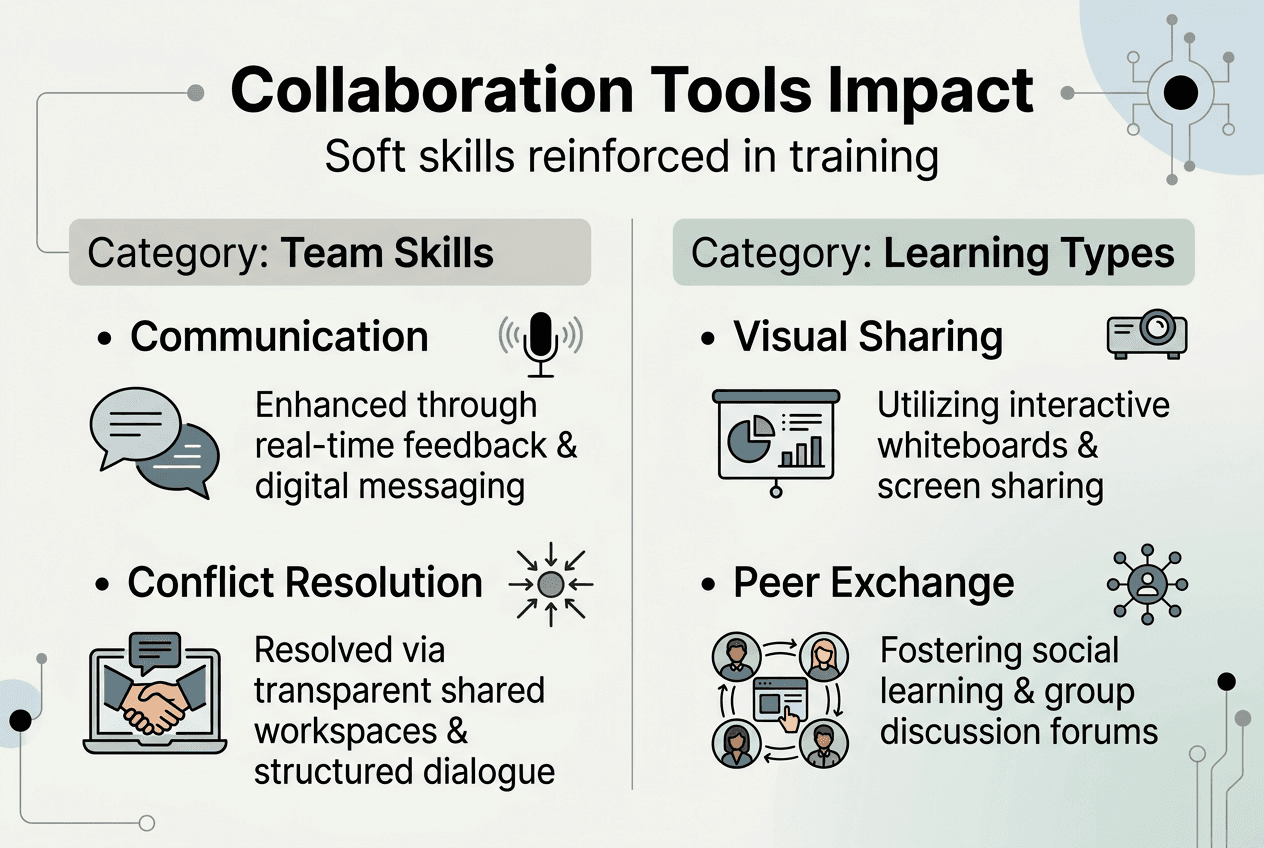
Diverse learning preferences also benefit from collaboration tool flexibility. Visual learners can share diagrams and screenshots. Verbal processors can hop on quick calls. Reflective thinkers can contribute asynchronously through threaded discussions. This variety ensures that collaborative learning for remote teams reaches everyone effectively, regardless of their preferred learning style or work schedule.
Cross-departmental collaboration: Aligning goals with learning and development
One of the most persistent challenges in corporate training is getting different departments to work together on learning initiatives. Marketing wants product knowledge training, operations needs compliance updates, and IT requires security awareness programs. Without effective collaboration mechanisms, these competing priorities create fragmented training experiences and duplicated efforts.
Collaboration tools provide the connective tissue that aligns these disparate needs. Shared project spaces allow L&D professionals to coordinate with department heads, understand specific training requirements, and design programs that serve multiple stakeholders simultaneously. Instead of isolated email chains and quarterly planning meetings, continuous communication keeps everyone aligned as business needs evolve.

Cross-departmental collaboration in L&D becomes particularly valuable when organizations face rapid change. New regulations, market shifts, or technology adoptions require quick training responses. Communication cycles in L&D alignment enable learning teams to mobilize subject matter experts from relevant departments, design targeted content, and deploy training within days rather than months. This agility directly impacts business performance and compliance posture.
The benefits extend beyond speed. When departments collaborate on training design, the resulting programs better reflect real-world workflows and challenges. A compliance training module developed with input from legal, operations, and frontline managers will address practical scenarios that generic content misses. Employees recognize this relevance and engage more deeply with the material.
Common obstacles to cross-functional collaboration include misaligned priorities, territorial behavior, and simple logistical friction. Collaboration platforms reduce these barriers by creating transparent workflows where everyone can see project status, contribute ideas, and understand how their input fits the larger training strategy. Visibility builds trust and reduces the perception that L&D operates in isolation from business realities.
Pro Tip: Establish regular cross-departmental sync meetings using your collaboration platform’s video and screen-sharing features, but keep them focused on outcomes rather than status updates. Use shared documents to track decisions and action items so everyone stays accountable between meetings.
Effective collaboration also requires clear ownership and decision-making authority. Tools should clarify who owns which aspects of training initiatives, who needs to provide input versus approval, and how conflicts get resolved. Without this structure, collaboration platforms can amplify confusion rather than reduce it.
Technology architecture and platform standardization for effective collaboration
Understanding the technical foundations of collaboration tools helps L&D leaders make smarter implementation decisions. Most modern collaboration platforms use a client-server model with cloud-based infrastructure that enables real-time communication, document sharing, and project management across devices and locations. This architecture supports the seamless experiences users expect, from instant messaging to high-quality video conferencing.
The technology stack typically includes several layers. The presentation layer handles user interfaces across web browsers, desktop applications, and mobile apps. The application layer manages business logic like permissions, notifications, and workflow automation. The data layer stores messages, files, and user information with redundancy and security controls. Integration APIs connect collaboration platforms to other enterprise systems like learning management systems, HR databases, and productivity suites.
Real-time features rely on technologies like WebSockets and WebRTC that maintain persistent connections between clients and servers. This allows instant message delivery, live document co-editing, and low-latency video calls without constant page refreshes or manual syncing. For L&D applications, these capabilities enable interactive virtual classrooms, live coaching sessions, and immediate feedback on collaborative assignments.
Platform standardization delivers significant advantages over a fragmented tool landscape. When organizations commit to a single collaboration ecosystem, user adoption skyrockets because employees only need to learn one interface and workflow. The Microsoft Teams adoption at PepsiCo demonstrates this effect, achieving a 90-95% daily active usage rate for Microsoft 365 Copilot by standardizing on Teams rather than supporting multiple competing platforms.
| Approach | Adoption Rate | User Experience | Integration Complexity | AI Readiness |
|---|---|---|---|---|
| Standardized Platform | 85-95% | Consistent, familiar | Low, unified APIs | High, shared data layer |
| Multiple Tools | 40-60% | Fragmented, confusing | High, disparate systems | Low, siloed data |
| Hybrid Mix | 55-75% | Moderate inconsistency | Medium, selective integration | Medium, partial unification |
Standardization also creates a unified data layer that supports advanced features like AI-powered search, intelligent recommendations, and automated workflow suggestions. When all collaboration data flows through one platform, machine learning models can identify patterns, surface relevant content, and predict user needs more accurately than fragmented systems allow.
Pro Tip: Before investing in AI-enhanced collaboration features, ensure your infrastructure standardization is complete. AI tools perform best when they can access comprehensive, unified data rather than scattered information across multiple platforms.
Security and compliance considerations also favor standardization. Managing data governance, access controls, and audit trails across multiple platforms multiplies complexity and risk. A single platform simplifies policy enforcement, reduces shadow IT risks, and provides centralized monitoring of sensitive information sharing.
Measuring impact: How collaboration tools improve training outcomes
Quantifying the value of collaboration tools in corporate training requires tracking specific metrics that connect platform usage to business outcomes. Leading organizations measure both leading indicators like engagement and participation rates, and lagging indicators like performance improvements and retention statistics.
Return on investment studies provide compelling evidence for collaboration tool effectiveness. Adobe Learning Manager can deliver a Return on Investment of 337%, demonstrating that well-implemented learning technology generates substantial financial returns. These returns come from multiple sources: reduced training delivery costs, faster time to productivity for new hires, improved employee retention, and enhanced performance across the organization.
Employee satisfaction and retention metrics reveal collaboration tool impact on workplace culture. Absorb Software experienced a 28% reduction in employee attrition and a 50% improvement in employee satisfaction after implementing their learning management and collaboration systems. When employees can easily access knowledge, connect with colleagues, and develop skills through collaborative learning, they feel more valued and engaged with their work.
| Metric Category | Specific Measures | Typical Improvement Range |
|---|---|---|
| Engagement | Active daily users, message volume, document collaboration frequency | 40-90% increase |
| Learning Speed | Time to competency, training completion rates, knowledge assessment scores | 25-50% faster |
| Business Impact | Employee satisfaction, voluntary attrition, performance ratings | 20-50% improvement |
| Cost Efficiency | Training delivery costs, travel reduction, instructor time savings | 30-60% reduction |
Time to productivity represents another critical measure. Collaboration tools accelerate how quickly new employees reach full productivity by connecting them with experienced colleagues, providing easy access to institutional knowledge, and enabling real-time guidance on complex tasks. Organizations often see 30-40% reductions in onboarding time when collaboration platforms support structured peer mentoring and knowledge sharing.
Training completion and application rates improve when collaboration features enhance learning programs. Discussion forums, group projects, and peer review activities increase engagement beyond passive content consumption. Learners who actively participate in collaborative exercises demonstrate higher knowledge retention and better skill application on the job.
- Track correlation between collaboration platform usage and performance review scores
- Monitor voluntary participation in peer learning groups and knowledge-sharing channels
- Measure reduction in repeat questions and support tickets as knowledge bases grow
- Analyze relationship between cross-functional collaboration frequency and innovation metrics
- Survey employees on perceived learning effectiveness before and after collaboration tool implementation
Qualitative feedback complements quantitative metrics. Regular pulse surveys asking employees how collaboration tools support their learning and development provide insights that numbers alone miss. Comments about specific features, workflow improvements, or persistent pain points guide continuous optimization of your collaboration strategy.
Explore DigitalEdu solutions for smarter collaboration
Transforming your corporate training effectiveness requires more than understanding collaboration tools. You need practical implementation support, proven methodologies, and technology that adapts to your unique organizational context. DigitalEdu specializes in helping learning and development teams leverage AI-powered collaboration and training solutions that drive measurable engagement and performance improvements.
Our platform integrates collaborative learning features with comprehensive analytics, customizable pathways, and team coordination tools used by over 500 organizations. Whether you’re enhancing remote team training, aligning cross-functional learning initiatives, or measuring training ROI, DigitalEdu learning services provide the infrastructure and expertise you need. Start by taking our AI evaluation quiz to identify your specific collaboration and learning technology needs, then explore the DigitalEdu collaboration tools shop for solutions tailored to modern corporate training challenges.
FAQ
How do collaboration tools enhance informal learning in corporate settings?
Collaboration tools create digital spaces where employees naturally share knowledge, ask questions, and solve problems together without formal training structures. These platforms enable quick exchanges through chat, video calls, and shared documents that mirror the hallway conversations and desk-side mentoring that happen in physical offices. The persistent nature of digital collaboration also means knowledge shared once becomes searchable and reusable, extending informal learning’s impact beyond the original participants.
What challenges do collaboration tools help overcome in cross-functional training?
These platforms break down communication silos that typically prevent departments from coordinating on training initiatives. Shared project spaces, transparent workflows, and real-time updates ensure everyone understands training objectives, timelines, and responsibilities regardless of their organizational position. Collaboration tools also reduce scheduling friction by supporting asynchronous communication, allowing busy stakeholders to contribute input and feedback on their own schedules rather than requiring everyone in simultaneous meetings.
Why is platform standardization important for collaboration tools in large organizations?
Standardizing on a single collaboration platform dramatically increases user adoption because employees only need to learn one system rather than juggling multiple tools with different interfaces and capabilities. Unified platforms also enable comprehensive data integration, allowing AI features to analyze communication patterns, suggest relevant content, and automate routine tasks across the entire organization. The consistent user experience reduces training overhead and eliminates the productivity losses that occur when teams waste time deciding which tool to use for each interaction.
How can learning and development professionals measure ROI from collaboration tools?
Track direct metrics like training completion rates, time to competency for new hires, and employee engagement scores before and after collaboration tool implementation. Monitor business impact indicators including voluntary attrition rates, performance review scores, and the frequency of cross-functional knowledge sharing. Regular employee surveys asking how collaboration features support their learning and development provide qualitative context that explains the quantitative trends and identifies specific areas for optimization.